WordPress migration · headless WooCommerce · custom web apps
Modernize your site without losing Google, or control of your operation.
I move content sites from WordPress to Astro on Cloudflare, where hosting drops to roughly the price of the domain. For established stores and big publishers, I keep WordPress and WooCommerce as the back office and replace only the storefront. And when no CMS fits, I build custom solutions with dashboards tailored to your operation.
Sources: W3Techs, Patchstack and the vendors’ pricing pages. Details and links in the article. Read the full analysis: is WordPress dying? →
Three paths, depending on your operation
Content sites
Full migration to Astro + Cloudflare
Corporate sites, landing pages, blogs and docs leave WordPress for good. Pages ship as ready-made HTML from the CDN, and hosting usually drops to the price of the domain.
Established stores and big publishers
WordPress as the back office, static storefront
WooCommerce keeps orders, stock, payments and the dashboard your team already knows. Categories, products and articles become a fast Astro storefront; cart and account talk to WooCommerce through its APIs, and checkout can stay on WooCommerce.
Specific needs
Another CMS or a fully custom build
Keystatic, Decap or TinaCMS for content in Git; Storyblok, Sanity or Contentful in the cloud; Strapi, Payload or Directus self-hosted. Or a custom solution with dashboards designed around your workflow, running on Cloudflare Workers, D1 and R2.
Not just new pages. Whatever your business needs.
Once the front end is code instead of a theme and a stack of plugins, the limit is your idea, not the plugin directory:
Fast content sites
Corporate sites, landing pages, blogs and docs in several languages, with SEO and structured data done right.
Headless storefronts
Catalog and product pages served from the edge, with cart, prices and stock live from WooCommerce.
Calculators and tools
Simulators, calculators and in-browser tools that bring in qualified traffic and leads.
Configurators and quotes
Product configurators and quote builders tied to your sales process.
Custom dashboards and portals
Dashboards built around what your team needs to manage, approve and track, plus B2B portals, dealer pricing and customer accounts.
Integrations and AI
ERP, CRM, payments, booking and AI agents that automate the work that eats your week.
What you stop paying
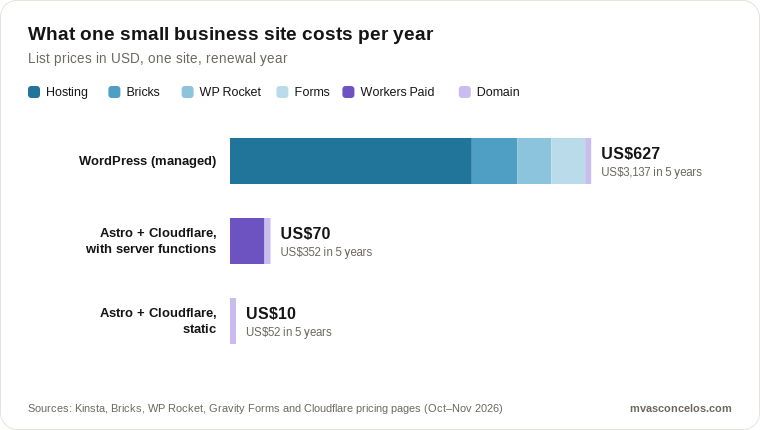
One content site, renewal year, list prices. On WordPress you pay for hosting and for the plugins that keep it fast, safe and useful. On Cloudflare a static site is free to host, and server functions, database and storage have generous free tiers.
| Managed WordPress | Astro + Cloudflare | |
|---|---|---|
| Hosting | US$35/month (Kinsta, WP Engine) | US$0 (Cloudflare Pages) |
| Visual builder | Bricks Builder, US$79/year | Not needed |
| Cache and speed | WP Rocket, US$59/year | Not needed |
| Forms | Gravity Forms, US$59/year | Cloudflare function, free tier |
| Database | Included with hosting | Cloudflare D1, 5 GB free |
| .com domain | ~US$10.46/year | ~US$10.46/year |
| Per year | ~US$627 | ~US$10 to US$70 |
On the back office path, WordPress still needs hosting, so the bill does not drop to the domain; it drops because the server now serves your team and API calls instead of every visitor, and theme, builder and cache plugins go away. Not tied to one vendor either: Netlify, Vercel and GitHub Pages also host static sites for free.
Faster by default, not after a pile of plugins
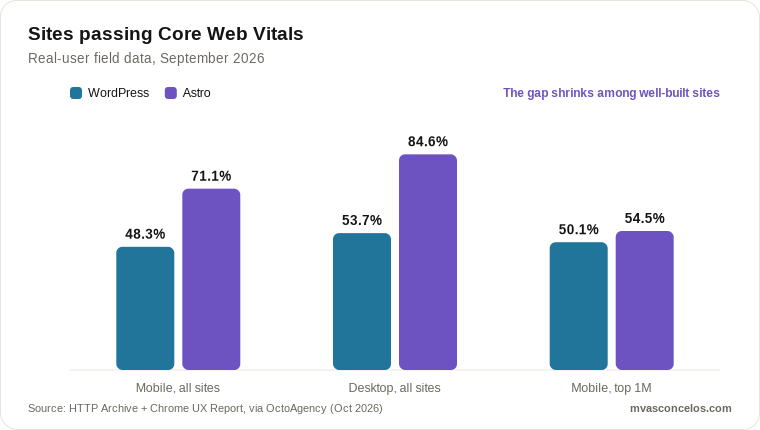
Real-user data: 71.1% of Astro sites pass Core Web Vitals on mobile, against 48.3% of WordPress sites. Among the top million sites the gap shrinks, which tells you the truth: WordPress can be fast, it just costs work and money to keep it that way.
Why I can say this
I used the best WordPress had to offer, including Bricks Builder since its early versions, when it was the cleanest builder around. It was the best WordPress I ever built.
And I still hit the same ceiling: every visit went through PHP, plugins and the database to rebuild a page that rarely changed. Handling load meant cache plugins, a CDN, bigger hosting and licenses renewing every year.
Today I run my own sites on Astro and Cloudflare, with main content loading in about half a second on mobile for real visitors. And I still look after WordPress and WooCommerce in my day job, so I know what a store or a newsroom cannot afford to lose, and when not to migrate.
Right now I am migrating the sites of the company I work for, and not just swapping technology: each site is gaining features that turn it into a sales machine, with fast product pages, online quotes and configuration, lead capture and qualification, and a direct line into the sales team. That is the same approach I bring to your project.
Marco Vasconcelos
How it works
Diagnosis
I audit the current site, list every URL, plugin, integration and team workflow, and estimate the running cost before and after. You decide with numbers.
Plan
We choose the path: full migration, WordPress as the back office or another CMS. Then what moves, what goes, what becomes a feature, and the 301 map for every old URL.
Build
Astro, Git and AI-assisted development, with a private preview link so you review real pages, not mockups. On the back office path, your team keeps working as usual.
Launch
One-to-one redirects, structured data, Search Console and analytics checked on day one, and monitoring in the weeks after.
Grow
With the front end as code, new tools, integrations and automations are projects, not plugin hunts.
When I will tell you not to switch platforms
- A mature WooCommerce store that sells well and whose team depends on its dashboard.
- A newsroom publishing all day with a non-technical team.
- A site that depends on a mature plugin with no real replacement, like a complex membership area or LMS.
- A WordPress site that is fast, secure and cheap enough already.
For the first three, the answer is usually to keep WordPress as the back office and modernize only the storefront. For the last one, leave it alone.
Questions
Will I lose my Google rankings?
Not if the migration is done with process: every old URL mapped, one-to-one 301 redirects, metadata and structured data preserved, and Search Console monitored after launch.
Can I modernize a large WooCommerce store without changing platforms?
Yes. WordPress and WooCommerce stay as the back office for orders, stock, payments and the dashboard, while catalog and product pages move to a fast Astro storefront on Cloudflare. Checkout can stay on WooCommerce.
Which CMSs work with Astro besides WordPress?
Many: Keystatic, Decap and TinaCMS (content in Git), Storyblok, Sanity, Contentful and Prismic (cloud), Strapi, Payload and Directus (open source), plus Drupal, Craft and Cloudflare’s EmDash. When none fits, I build a custom dashboard.
How much does hosting cost afterwards?
For a static content site, usually only the domain (about US$10 a year for a .com). With WordPress as the back office you still pay for its hosting, but the server handles far less load. Cloudflare’s paid plan for server functions is US$5 a month.
How long does it take?
It depends on size, integrations and the path we choose. A small corporate site takes days to a few weeks; large stores and publishers move in stages. You get a timeline after the diagnosis.
Do you work in Portuguese and French?
Yes. I work in English, Portuguese and French, with clients in Canada, the US and Brazil.
Let’s look at your site together
In 30 minutes we go over your current site, what it costs you and which path makes sense for your operation. No commitment.