Is WordPress dying? What the data says for 2027 (and why I left)
WordPress fell from 43.6% to 39.5% of the web and PHP has been shrinking for a decade. What it means for 2027, hosting and plugin costs, and when to migrate (or not).
No, WordPress is not dead. But for the first time in more than a decade, it is genuinely shrinking. And something else did die: the habit of picking WordPress by default, without thinking, for every site.
I say this from the inside. I used the best the ecosystem had to offer, including Bricks Builder since its early versions, back when few people had heard of it. I still look after WordPress and WooCommerce in my day job. And I still moved my own projects off it. In this article I separate data from trend from hype, show what each option costs to keep online, tell you when I would not recommend migrating, and lay out the middle path for big stores and publishers, plus other CMSs and custom builds.
Is WordPress dying in 2027? What the numbers show
Straight to it: according to W3Techs (compiled by OctoAgency), WordPress peaked at 43.6% of all websites in January 2025, sat near 43% for years and fell to 39.5% on October 28, 2026. Among sites that use any CMS, its share went from 65.2% in 2022 to about 58%.
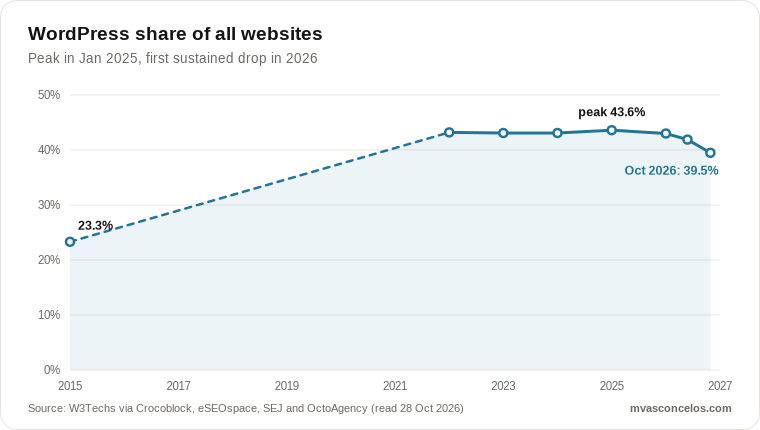
Now the context the alarmist headlines leave out:
- WordPress is still about 7 times bigger than the runner-up, Shopify, at around 5% of the web. At the current pace, it would take decades to stop being the largest CMS.
- The loss did not go to a competitor. The category that grew was “no detectable CMS”, from 28.6% to 32.1% of sites in a year. These are sites built in code, with frameworks like Astro and Next.js, and more and more of them built with AI.
- Part of the drop may be a sampling change at W3Techs. Crocoblock, a company that lives off WordPress, suggests treating 2026 as a signal, not a verdict. I agree.
So “WordPress is dead” is a headline. “WordPress stopped growing and is losing new sites” is the data.
And PHP, is it dead?
“PHP is dead” has been a meme for about 20 years. The numbers show a slow, steady slide, not a collapse: 80.6% of sites with a known server-side language in 2015, 72.4% in January 2026 and around 69.5% in October.
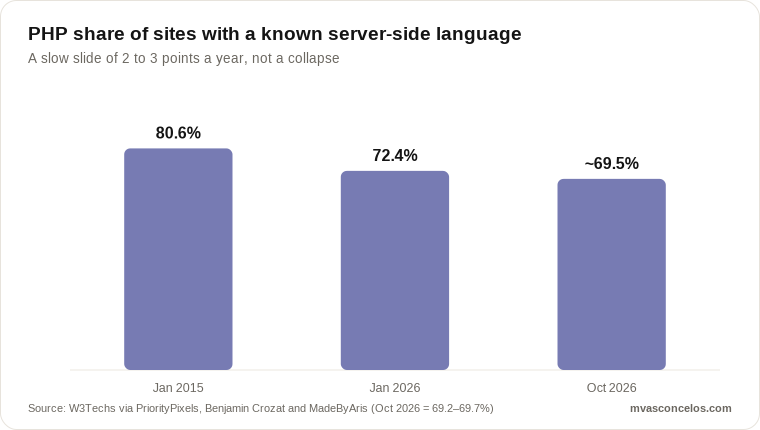
Honestly, modern PHP is better than ever. PHP 8 is now the majority, Laravel is used by 64% of PHP developers (JetBrains, 2025) and there is a new release every year. What is happening is simpler: new projects are being born on other stacks. The installed base is still there, and will be for a long time.
💡 A deadline that actually matters: PHP 8.2 loses security support on December 31, 2026. If your site runs on it, you have a concrete reason to act, whether that means upgrading or migrating. I explain what to do in this guide.
Why I left WordPress, even with Bricks Builder
I did not leave because it was trendy. I was exactly the person who defended well-built WordPress.
I adopted Bricks Builder in its early versions because it fixed the worst sin of visual builders: bloated HTML. Next to Elementor and friends, the output was clean, light and under real control. It was the best WordPress I have ever built.
And I still hit the same ceiling. Because the problem was not the builder. Every visit still went through the same chain: server, PHP, WordPress, theme, plugins, database and, only at the end, the page. To handle load I needed a cache plugin, a CDN, hosting with more “PHP workers” and a stack of licenses that renew every year. When traffic went up, the bill went up with it. When a plugin updated, I crossed my fingers.
Bricks made WordPress faster. It did not change the fact that a content site that rarely changes was being rebuilt on every single visit.
On a static Astro site, the chain becomes: visitor, CDN, ready-made HTML. Vale a Pena Visitar, my travel blog that moved from WordPress to Astro on Cloudflare, records a mobile LCP of 0.5 seconds on its English home page, measured from real visitors by Cloudflare (still a small sample, but it is my data, not a vendor’s).
And it is not only my own projects. Right now I am migrating the sites of the company I work for, and the goal is not just to swap technology. It is to use the move to add features that turn each site into a sales machine: fast product pages, online quotes and configuration, lead capture and qualification, and a direct line into the sales team. On a theme with plugins, each of those would be one more plugin to pay for and maintain. In code, it becomes part of the product.
That is my experience, at least. Now let us see whether the wider data agrees.
Performance: the most solid data point (and the nuance nobody tells you)
HTTP Archive combines real-user Chrome data (compiled by OctoAgency). In September 2026, 71.1% of Astro sites passed Core Web Vitals on mobile, against 48.3% of WordPress sites. On desktop it was 84.6% against 53.7%.
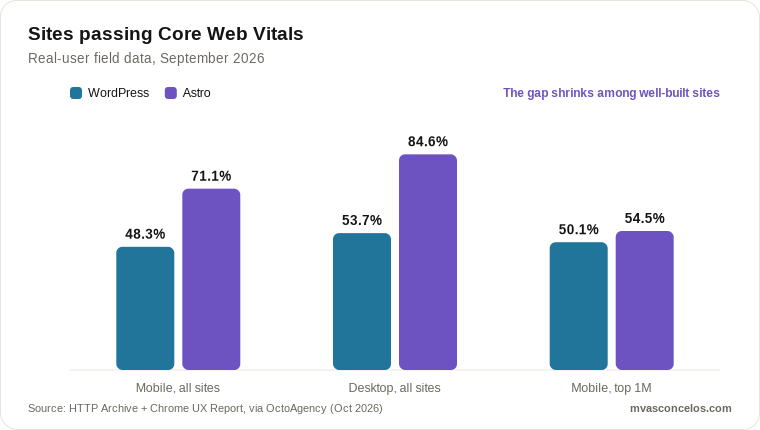
Look at the third pair of bars. Among the million most visited sites, the gap drops to 4.4 points (54.5% vs 50.1%). In other words, a well-built, well-maintained WordPress site does pass Core Web Vitals. What drags the average down are heavy builders and piles of plugins.
That is why I do not sell speed as an absolute promise. I sell architecture: on a static site, fast is the default. On WordPress, fast takes work, and work costs money.
Security: the risk is in the plugins, not the core
Patchstack’s 2026 report (summarized by Lynton) counted 11,334 new vulnerabilities in the WordPress ecosystem in 2025, 42% more than the year before.
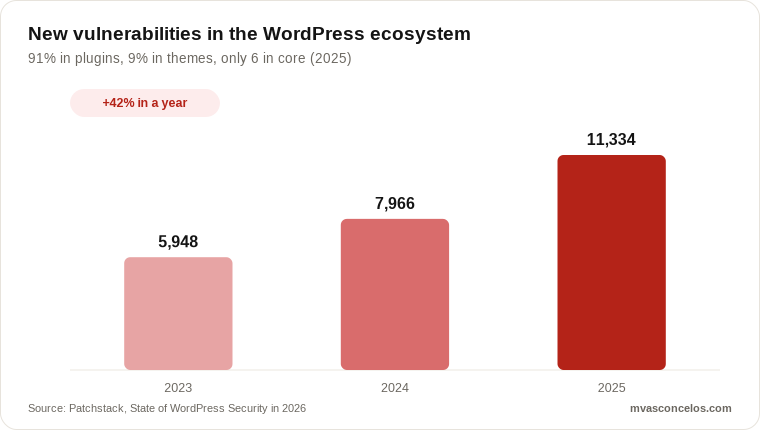
The details matter more than the total:
- 91% were in plugins, 9% in themes and only 6 in WordPress core.
- 46% had no patch on the day they were disclosed.
- In the most targeted subset, the median time from disclosure to mass exploitation was 5 hours.
⚠️ To be fair: the high number also reflects more people hunting for bugs (Patchstack pays for it). It does not prove your site will be hacked. The point is structural: every plugin is one more vendor with access to your server. A static site has no PHP, no exposed database and no public login page. There is not much left to attack.
What a site really costs: WordPress vs Astro on Cloudflare
This is where small business owners usually get a shock. I put together a conservative estimate for one site, in a renewal year, at list prices in US dollars:
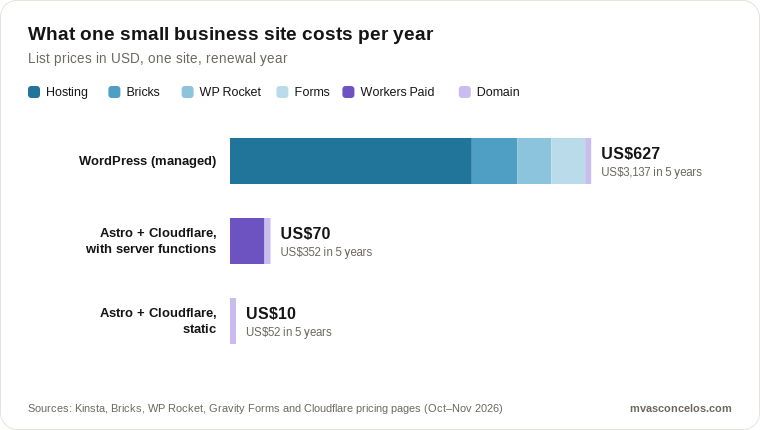
| Item | Managed WordPress | Astro + Cloudflare |
|---|---|---|
| Hosting | US$35/month (Kinsta or WP Engine, 1-site plan) | US$0 (Cloudflare Pages: unlimited bandwidth for static files, 500 builds a month) |
| Visual builder | Bricks Builder Starter, US$79/year | Not needed |
| Cache and performance | WP Rocket, US$59/year | Not needed |
| Forms | Gravity Forms Basic, US$59/year | A Cloudflare function (100,000 requests a day free) |
| Database | Included with hosting | Cloudflare D1, 5 GB free |
| .com domain | ~US$10.46/year | ~US$10.46/year (Cloudflare sells at cost) |
| Total per year | ~US$627 | ~US$10 to US$70 |
| Over 5 years | ~US$3,137 | ~US$52 to US$352 |
A few honest notes:
- I left a lot out on the WordPress side: custom fields (ACF Pro), premium SEO, backups and security. One agency that documented its own stack reached about US$1,096 a year in licenses alone, before writing a single line of content.
- Shared hosting is cheaper at first, but renewals often cost several times the intro price, and performance makes up the difference.
- The US$70 on the Cloudflare side is the Workers Paid plan (US$5/month), which only kicks in when a site runs a lot of server logic. Forms, booking and small APIs usually fit in the free plan. This very site, with its own booking system and database, runs on Cloudflare.
- It is not only Cloudflare. Netlify, Vercel and GitHub Pages also have free plans for static sites, each with its own rules (Netlify, for example, moved to a credit system in 2025). I prefer Cloudflare for the unlimited bandwidth plus database, storage and functions in one place.
Read also: How much does it cost to run a WordPress site in 2027, and when is Astro cheaper?
In practice, for a content site, you end up paying for little more than the domain. The money that went to licenses becomes budget for what actually moves the needle: content, tools and features.
The new argument for 2027: AI works better with code than with a dashboard
This is what changed the game this year.
An AI agent works with files: it reads, searches, edits and compares versions. An Astro site is exactly that. Every page is a file, everything lives in a Git repository, and any change can be reviewed and rolled back. WordPress is a database plus a dashboard, which is opaque to an agent.
The 2026 reports line up: agencies moving three sites from WordPress to Astro in three weeks with Claude, against estimates of two to three months without AI, and hosting going from US$25–40 a month to zero. This is exactly how I work today, including on this site.
⚠️ Two caveats, to avoid the hype:
- “I migrated in an hour” stories are the exception, from small sites. Reviewing, testing and redirecting URLs takes longer than generating the code.
- WordPress is catching up too. WordPress 7.0, released in May 2026, put an AI client in core, and Cloudflare (which acquired Astro in January) launched EmDash, a TypeScript CMS built for agents. Saying “WordPress and AI do not mix” is no longer true. Saying a site in code is easier to maintain with AI still is.
If you want to use AI to build your company’s own system, I wrote about the real risks and the process that works in vibe coding for businesses.
When I would NOT migrate off WordPress
This is what separates consulting from selling funerals. I would not migrate:
- Mature WooCommerce stores. WooCommerce runs about a third of the world’s online stores and solves a lot out of the box. No serious article recommends switching platforms because it is trendy. Modernizing the storefront is another story (more on that below).
- Newsrooms publishing all day, with non-technical teams who rely on the visual editor and editorial workflows. Here too, the answer is usually to replace only the front end.
- Sites that depend on mature, hard-to-replace plugins, such as complex membership areas or an LMS.
- Well-built, fast, well-maintained sites where the license bill does not hurt. If it works and pays for itself, leave it alone.
In those cases, switching platforms is not the answer. Cleaning up plugins, upgrading PHP and changing hosts already help. And for large operations there is a middle path that I consider the best of both worlds.
The middle path for big stores and big publishers: WordPress as the back office, a static storefront
Not everyone can (or should) throw WordPress away. A WooCommerce store with years of operation has orders, stock, customers, ERP and shipping integrations, and a team that can run the dashboard with their eyes closed. A publisher with thousands of articles has a newsroom workflow, reviews and scheduling. Replacing all of that at once is too much risk for the business.
For these cases there is a path I really like: keep WordPress as the back office and replace only the storefront. This is what people call headless WordPress.
In practice it looks like this:
- WordPress and WooCommerce stay where they are, handling products, orders, stock, payments, customers and the editorial workflow. The team keeps the same dashboard and nobody has to relearn the operation.
- The storefront becomes an Astro front end on Cloudflare. Category pages, product pages and articles ship as ready-made HTML from the CDN. That is where almost all visits land, and that is where the speed and SEO gains show up.
- What is dynamic stays dynamic. Cart, price, stock and customer accounts talk to WooCommerce through the Store API (
/wp-json/wc/store/v1/) or the REST API, as interactive components or pages rendered on demand. - Checkout can stay on WooCommerce itself, with every payment gateway you already use, or be rebuilt to measure when it is worth it.
- When a product or a post changes in the dashboard, a webhook tells Cloudflare to refresh just that page.
What you gain: a fast storefront, the WordPress dashboard out of public reach (it can live on a protected subdomain), no more theme, page builder and cache plugins, and a migration that can be gradual, starting with the blog or the catalog.
⚠️ The honest side: there are two systems to maintain. WordPress still needs hosting, updates and plugin care, so the bill does not drop to the price of a domain here. It drops because the WordPress server now serves the team and API calls, not every visitor. Draft previews, SEO metadata and cache rules need careful planning. And for a small shop with few products and little traffic, the complexity usually does not pay off.
Other CMS options that work with Astro
WordPress is not the only way to give your team a dashboard. Astro’s documentation has guides for more than 40 CMSs. The ones I consider, by profile:
| Profile | Options | When it makes sense |
|---|---|---|
| Content in the repository (Git) | Keystatic, Decap CMS, TinaCMS, CloudCannon | Corporate sites and blogs. No extra server, everything versioned. |
| Cloud CMS | Storyblok, Sanity, Contentful, Prismic, DatoCMS, Hygraph | Marketing teams that want a visual editor without running a server. Per-seat pricing. |
| Open source, self-hosted | Strapi, Payload, Directus | Full control of your data and no per-seat cost. Needs a server and a database. |
| Traditional CMSs in headless mode | Drupal, Craft CMS, Statamic, Ghost, Umbraco | Teams already on one of them that only want a modern front end. |
| Cloudflare’s bet | EmDash | A TypeScript CMS built on Astro and designed for AI agents. Promising, but its ecosystem is still small. |
For e-commerce outside WordPress, Shopify (through the Storefront API) and Medusa also work as the store engine behind an Astro storefront.
When no CMS fits: a fully custom solution
Sometimes the business rules are so specific that any CMS turns into a workaround: a quote configurator, a B2B portal with dealer-specific pricing, a tool that calculates something only your company calculates. Then the right path is a dashboard and an API built for you. This is where I most enjoy working: I build custom solutions with dashboards tailored to what each client needs. That can mean managing products and prices, tracking orders and quotes, approving content or seeing the numbers that matter on a single screen. Your team gets a dashboard with the fields and screens that make sense for the business, without the menus and plugins nobody uses.
All of it fits on Cloudflare: Workers for the API, D1 as the database, R2 for files and images, and protected access for your team. The booking system on this site is exactly that: its own calendar, a D1 database, spam protection and confirmation emails, with no plugin at all. When a project calls for Postgres, Supabase is also a solid base.
The upside is full control with no licenses. The trade-off is that someone has to maintain that code, which is why I only build what the business actually uses.
When migrating makes sense
Migrating pays off when the site:
- Is content-driven and rarely changes: corporate sites, portfolios, landing pages, blogs, documentation.
- Pays for licenses and hosting that its results do not justify.
- Has been hacked, is always slow or needs a developer for every plugin update.
- Needs to grow into an application: calculators, booking, client portals, integrations, AI automation. Here the sky is the limit, because you are no longer stuck with whatever exists as a plugin.
And the number one fear, losing Google rankings, is solved with process, not promises: a map of every old URL, one-to-one 301 redirects, rebuilt structured data and Search Console monitoring after launch.
Frequently asked questions
Is WordPress going away?
Not on any visible horizon. It still runs about 40% of the web and 58% of sites with a CMS. What ended is its growth and its status as the default choice for new sites.
Is PHP dead?
No. It is losing share slowly (about 2 to 3 points a year), but the modern language is active, fast and widely used with Laravel. It is new projects that are choosing other stacks.
How much does it cost to host an Astro site on Cloudflare?
For a static site, Cloudflare Pages’ free plan covers hosting with unlimited bandwidth. Your fixed cost becomes the domain, around US$10 a year for a .com. Server functions get 100,000 free requests a day, and the paid plan is US$5 a month.
Will I lose SEO if I migrate from WordPress?
You do not have to. With a 301 redirect for every old URL, preserved metadata and structured data, and Search Console monitoring, rankings usually hold while speed improves.
Can Astro replace WordPress for any site?
No. Astro is excellent for content, marketing and custom applications. For a large WooCommerce store or a newsroom publishing all day, WordPress is often still the right call.
Can I modernize a large WooCommerce store without changing platforms?
Yes. With WordPress and WooCommerce as the back office and an Astro storefront on Cloudflare, pages get fast while operations (orders, stock, payments and the dashboard) stay the same. Checkout can stay on WooCommerce.
Which CMSs work with Astro besides WordPress?
Many: Keystatic, Decap and TinaCMS (content in Git), Storyblok, Sanity, Contentful and Prismic (cloud), Strapi, Payload and Directus (open source), plus Drupal, Craft and Cloudflare’s EmDash. And when none fits, a custom dashboard.
My verdict
WordPress is not dead, and anyone who says so is selling something. But the 2026 numbers show a real turn: it stopped growing, it is losing exactly the new content sites, and keeping a PHP, plugin and license stack running has become too expensive for what many sites deliver.
I used the best of WordPress for years. I left when I realized I was paying, every month, to rebuild the same page on every visit. For content sites and custom applications, that math no longer works. And for big stores and publishers, you can modernize the storefront without touching the operation.
What about you? Is your site on WordPress by choice or by habit? If you want, I will run the numbers with you.
Sources
- Market share (W3Techs): OctoAgency, eSEOspace, Crocoblock and WP Poland
- PHP: PriorityPixels, Benjamin Crozat, MadeByAris and JetBrains, The State of PHP 2025
- Core Web Vitals (HTTP Archive + CrUX): OctoAgency
- Security (Patchstack 2026): Lynton and Maize Network
- Pricing: Cloudflare, Cloudflare Pages limits, Workers pricing, Kinsta, WP Engine, Bricks Builder, WP Rocket and Gravity Forms (Oct–Nov 2026)
- Migrations and AI (self-reported numbers, one site each): Build A Better Website, Wunderlandmedia, OrenCloud, Half-Built Robots, SummitThemes (mfyz.com case) and Bourne Law
- CMSs with Astro: Astro’s official documentation
- WordPress 7.0 and EmDash: GoDaddy and InstaWP
- Vale a Pena Visitar: Cloudflare real-user data (Oct 2026, small sample)
Market numbers change every month. This article uses the readings available on November 8, 2026.