PHP 8.2 loses support on December 31, 2026 — what to do with your WordPress site before then
PHP 8.2 stops getting security fixes on December 31, 2026. How to tell if your WordPress site is affected, what to do step by step, and when migrating makes sense.
This is one of those deadlines nobody remembers until it becomes a problem: on December 31, 2026, PHP 8.2 stops receiving security fixes. From then on, any new flaw found in the language will not be patched in that version. If your WordPress site runs on PHP 8.2 (or something older), it will keep working just fine on January 1. Just exposed.
This is not a hot take or a prediction. It is a date on the calendar. In this article I explain how to find out if your site is affected, what to do before the deadline, and why this is a good moment to look at something bigger than your PHP version: the treadmill of plugins you have to maintain forever.
Read also: How much does it cost to run a WordPress site in 2027
What “losing support” means
Every PHP version has a life cycle. First it gets bug fixes, then only security fixes, and finally nothing. Since 2024, PHP’s official policy sets the end of security support on the last day of the year.
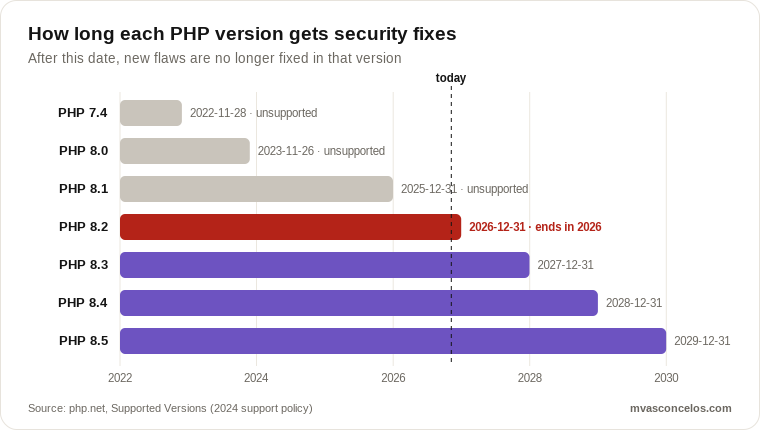
In other words: PHP 7.4, 8.0 and 8.1 are already unsupported, and 8.2 joins the list in a few weeks. If you are on 8.3, you have until the end of 2027; on 8.4, until the end of 2028.
And this is not theoretical. In October 2026, PHP fixed a set of serious flaws in the supported versions, and anyone on 8.1 or earlier simply did not get the fix.
How many sites are still behind
PHP 8 now runs on about 65.6% of PHP sites (MadeByAris, October 2026). Which means close to a third are still on PHP 7 or older, all of them unsupported for years. And within PHP 8, versions 8.0 and 8.1 already get no fixes.
How to check which PHP version your site uses
It takes a minute:
- In the WordPress dashboard, go to Tools > Site Health.
- Open the Info tab and expand the Server section.
- Look for the PHP version line.
Many hosts also show the version in their hosting control panel. If it says 8.2 or lower, this article is for you.
The problem was never WordPress core
Here is the part almost nobody explains. Updating PHP is easy. The hard part is what comes with it: plugins.
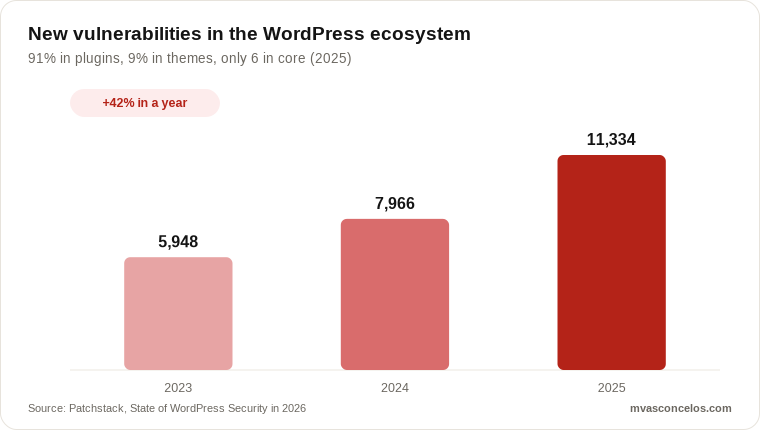
Patchstack’s 2026 report counted 11,334 new vulnerabilities in the WordPress ecosystem in 2025, 42% more than the year before. 91% were in plugins, 9% in themes and only 6 in WordPress core. Worse: 46% had no fix on the day they were disclosed, and in the most exploited subset the median time between disclosure and mass attack was 5 hours.
That is why switching PHP versions sometimes breaks a site: an old plugin, abandoned by its author, does not work on the new version. And it is also why so many people put off the update and stay on an unsupported PHP with outdated plugins. The worst of both worlds.
What to do before December 31, step by step
- Take a full backup (files and database) and confirm that it restores.
- List your plugins and theme. For each one, check the date of the last update and whether it declares compatibility with PHP 8.3 or 8.4. A plugin with no update in over a year is a red flag.
- Remove what you do not use. Every plugin you drop is one less vendor with access to your server.
- Test on a copy (staging). Most managed hosts offer one. Switch PHP on the copy, browse the site, test forms, checkout and login.
- Update PHP on the live site to 8.3 or 8.4, ideally at a low-traffic time.
- Monitor for a few days: site errors, and whether forms and payments still work.
If an essential plugin does not work on the new version, you have three options: switch to a maintained alternative, pay someone to adapt it, or rethink the site.
Update, modernize or migrate?
The PHP deadline is a good excuse for a decision a lot of businesses keep putting off:
- Update and clean up is the right call for a well-built WordPress site with few plugins and everything maintained.
- Modernizing the storefront makes sense for large stores and publishers: WordPress and WooCommerce stay as the back office, and the pages the public sees become a static site, fast and without the attack surface of PHP and plugins. I explain how it works in this article.
- Migrating pays off for content sites that rarely change: no PHP, no exposed database and no public login page means no version to update and no plugin to watch. On Cloudflare, hosting drops to close to the price of the domain.
In practice, I see plenty of corporate sites running WordPress only because “it has always been that way”, with a dozen plugins doing what a static site does out of the box. For those, every PHP update is a reminder of the cost of maintaining something that did not need to exist.
Frequently asked questions
What happens to my site when PHP 8.2 loses support?
Nothing changes the next day: the site stays online. What changes is that new security flaws in the language will no longer be fixed in that version, and the risk grows over time.
Which PHP version should I update to?
PHP 8.3 (supported until the end of 2027) or 8.4 (until the end of 2028), as long as your theme and plugins are compatible. Test first on a copy of the site.
Can updating PHP break WordPress?
WordPress core usually runs fine on newer versions. What breaks, typically, are old or abandoned plugins and themes. That is why staging tests and a plugin review come before the update.
Is it worth migrating instead of updating?
For content sites that rarely change, often yes: a static site does not depend on PHP or plugins, so it has no deadline of this kind. For large stores and publishers, the usual path is to modernize only the storefront.
My verdict
The end of PHP 8.2 support is a date, not a catastrophe. But it is the kind of date that shows how much of your site depends on things you do not control. Update if your WordPress site is lean and well maintained. And if every update turns into a scare, maybe the right question is not “which PHP?” but “does my site still need PHP?”.
Sources
- PHP, supported versions
- Patchstack, State of WordPress Security in 2026: Lynton
- PHP versions in use: MadeByAris
- October 2026 fixes and unpatched versions: Terris