How much does it cost to run a WordPress site in 2027 — and when is Astro cheaper?
The advertised WordPress hosting price is rarely what you pay in year two. The real math on renewals, plugins and maintenance, and when an Astro site costs next to nothing.
Your host sold you a plan at US$2.99 a month. At renewal, the same hosting cost US$17.99. Add plugin licenses, a security add-on and the hours spent on updates, and your “cheap site” becomes one of the most expensive fixed costs in the business.
I know this bill from both sides. For years I paid for a visual builder, caching, forms and managed hosting to keep WordPress fast, including Bricks Builder, which I have used since its early versions. Today my content sites run for little more than the price of a domain. In this article I do the full math for 2027, with the prices in effect today, and tell you when moving to Astro is cheaper and when it is not.
Read also: Is WordPress dying? What the data says for 2027 (and why I left)
The shock comes at renewal, not at signup
The headline price on a host’s page applies to your first term, almost always prepaid for 12, 36 or even 48 months. At renewal you pay list price. The True Cost of WordPress 2026 index puts the average shared hosting renewal at 320% above the advertised price.
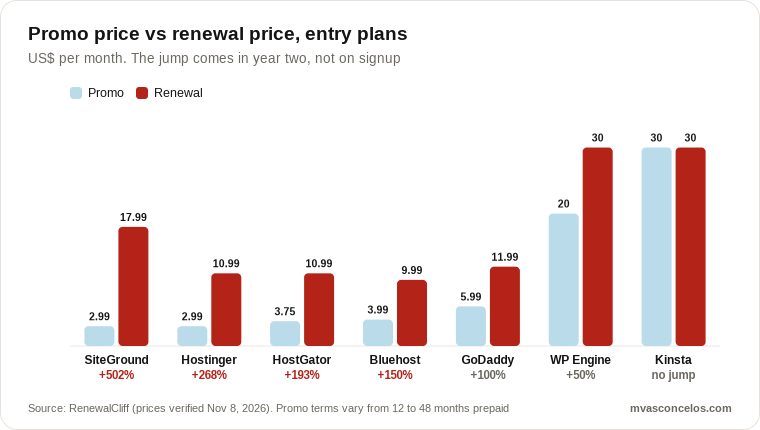
| Entry plan | Promo (US$/month) | Renewal (US$/month) | Jump |
|---|---|---|---|
| SiteGround StartUp | 2.99 (12 months) | 17.99 | +502% |
| Hostinger Premium | 2.99 (48 months) | 10.99 | +268% |
| HostGator Hatchling | 3.75 (36 months) | 10.99 | +193% |
| Bluehost Starter | 3.99 (36 months) | 9.99 | +150% |
| GoDaddy Economy | 5.99 (36 months) | 11.99 | +100% |
| WP Engine Startup | 20 (12 months) | 30 | +50% |
| Kinsta Single | 30 | 30 | no jump |
💡 How to compare properly: look at the renewal price or the 5-year cost, never the 3-year total. Long promo terms skew the comparison in favor of whoever has the biggest jump.
⚠️ Figures come from RenewalCliff, verified on November 8, 2026. Hosting prices change often and vary by plan and term. Check the vendor’s page on the day you decide.
The cost that is not on the banner: plugin licenses
WordPress is free. Production WordPress is not. The yearly licenses for the plugins a typical site runs add up to a second bill, and that one goes up too.
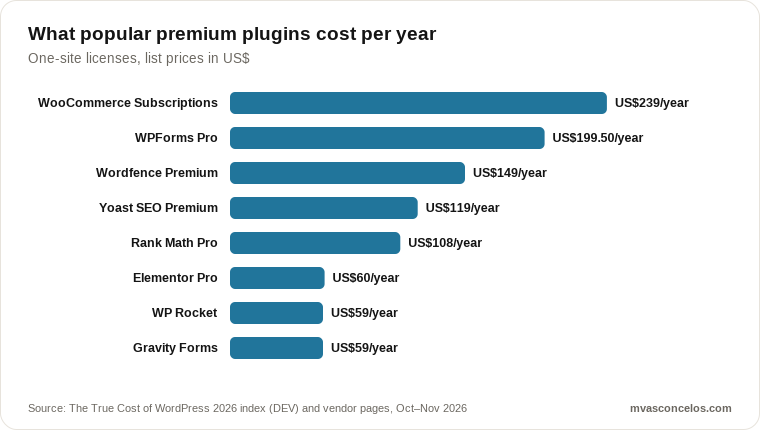
The same index documents increases of 15% to 167% within 12 to 18 months after plugins were bought by larger groups, often with tighter limits. Elementor cut its entry plan from 3 sites to 1. WP Rocket turned “unlimited” into a 50-site cap. Yoast Premium went from US$99 to US$119, and Wordfence Premium from US$119 to US$149.
All in, the index estimates:
- US$350 to US$800 a year in plugins alone for a site with a typical paid stack;
- US$1,200 to US$9,700 a year in total cost for a WordPress site, including hosting at renewal prices, plugins, security, maintenance and time.
These are estimates from list prices, not audited invoices. But the order of magnitude is what matters. And there is more the host does not include: WP Engine and Kinsta do not offer email, and WP Engine’s full security bundle (DDoS protection, firewall and CDN) is a US$450-a-year add-on. If you do not want to run updates at midnight, outsourced maintenance runs from US$39–120 a month at entry level to US$599–2,190 a month at the top.
The other side of the ledger: near zero is real (for content sites)
On the other side are static sites served from the edge of the network. The most generous free plan today is Cloudflare Pages. These limits come from the official documentation:
| Cloudflare Pages, free plan | Limit |
|---|---|
| Bandwidth, requests, sites and seats | Unlimited |
| Builds per month | 500 (one at a time, up to 20 minutes each) |
| Files per site | 20,000 |
| Max file size | 25 MiB (larger files go to R2) |
| Custom domains per project | 100 |
| Credit card | Not required |
A blog with hundreds of articles fits easily. There is a documented case of a blog with 661 articles and 2,515 images running on this plan. The only fixed cost left is the domain: about US$10.46 a year for a .com through Cloudflare’s registrar, which sells at cost and renews at the same price. When a site needs server code or a database, Workers Paid kicks in at US$5 a month. Still a fraction of the managed WordPress bill.
Being honest about “free”
Free tiers shrank at competitors in 2025 and 2026, and ignoring that would just swap one promo price for another:
| Platform | Free bandwidth | What runs out first on a blog | Commercial use on free? |
|---|---|---|---|
| Cloudflare Pages | Unlimited | 500 builds a month, 20,000 files | Yes |
| Netlify (new accounts) | ~15 GB a month (300 credits) | Credits: deploys and bandwidth share one pool | Yes |
| Vercel Hobby | 100 GB a month | The license, before the bandwidth | No (personal use only) |
| GitHub Pages | ~100 GB a month (soft limit) | 1 GB per site, 10 builds an hour | Not for a business or store |
On Netlify, accounts created since September 2025 get 300 credits a month, and when they run out every project pauses until the next cycle. On Vercel, a business site needs the Pro plan at US$20 a month per seat. One note on direction: Cloudflare itself now recommends Workers for new projects. Pages is still supported, but it is worth knowing where the platform is heading before you build on it.
The yearly bill, side by side
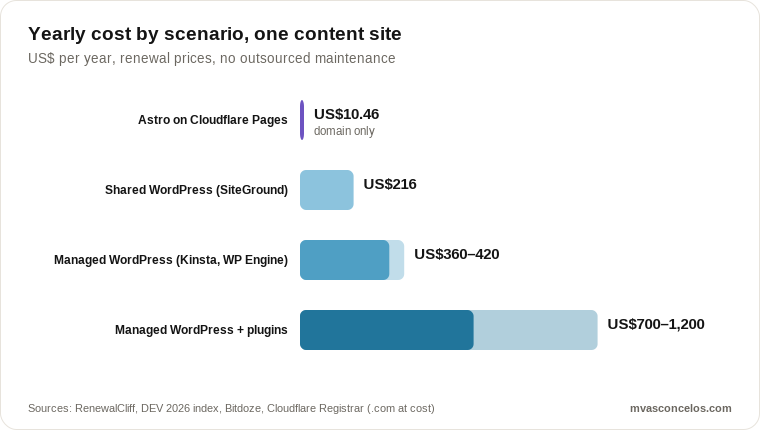
| Scenario (one content site) | Year 1 | Following years |
|---|---|---|
| Shared WordPress, Hostinger Premium (48 months prepaid) | ~US$36 | ~US$132 |
| Shared WordPress, SiteGround StartUp | ~US$36 | ~US$216 |
| Managed WordPress, Kinsta or WP Engine | US$360–420 | US$360–420 |
| Managed WordPress with typical plugins | ~US$700–1,200 | ~US$700–1,200 |
| Static Astro on Cloudflare Pages | ~US$10.46 | ~US$10.46 |
| Astro on Netlify (new account) | US$0 + domain | US$0 + domain, up to ~15 GB and ~20 deploys a month |
Outsourced maintenance is left out, and on its own it can exceed any number in this table.
And performance? Cheap cannot mean slow
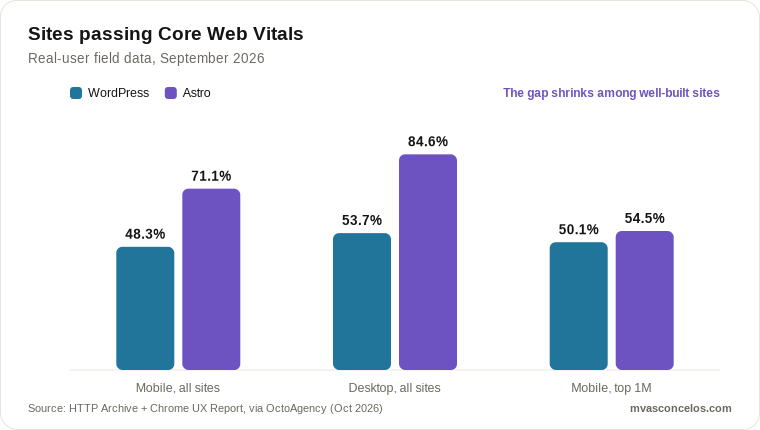
Low cost on a slow site just swaps one problem for another. In HTTP Archive’s real-user data, Astro sites pass Core Web Vitals far more often than WordPress sites: 71.1% vs 48.3% on mobile (September 2026). In an April 2026 dataset analyzed by Bitdoze, the median page weighs 1.65 MB on Astro against 2.76 MB on WordPress.
On the WordPress hosting side, the most rigorous benchmark I found (HostingStep, 525,600 measurements per host throughout 2025, identical installs) shows that even the slowest host stayed within Google’s “good” limit for server response time (800 ms). WP Engine came in at 365 ms, Kinsta at 459 ms and SiteGround at 632 ms. The real difference with managed hosts was reliability: shared hosting had 6 times more outages in the year.
⚠️ The counterpoint that keeps this honest: in the mfyz.com case, an already optimized WordPress site (WP Rocket plus Cloudflare caching) scored 99.1 on PageSpeed, and the same content rebuilt in Astro scored 99.5. The gains were in LCP (0.81 s to 0.44 s) and weight (72% less HTML, 90% less CSS). A well-optimized WordPress almost ties a static site. What you pay for on WordPress is not reaching that performance once. It is keeping it there through every update, every new plugin and every edit.
Real cases: money out, speed in
All cases are self-reported, one site each, and all are content sites, none are stores. Gains are bigger when the starting point was shared WordPress with a page builder and lots of plugins.
| Case | Cost before → after | Performance before → after |
|---|---|---|
| Wunderlandmedia, 3 client sites (2026) | US$25–40/month per site → US$0 | Lighthouse from 72–85 to 98–100, migrated in 3 weeks with AI |
| DailyManualLab, content site (2025) | US$15/month → US$0 | LCP from 4.2 s to 0.38 s, 23 fewer plugins |
| WPPoland, agency site (2026) | US$40/month → US$0 | PageSpeed 100, 4,700 pages in 6 languages |
| Paweł Cisło, personal site (2026) | ~US$52/year → ~US$24/year | Lighthouse from “painful” to near perfect |
And what does the migration itself cost? The market ranges from US$390 for sites up to 15 pages with lean services to US$6,000 and up with specialist agencies, and there are quotes of US$15,000–40,000 for 30 to 100 hand-built pages. Run the payback with your own number: if you pay US$40 a month for hosting and plugins, the migration pays for itself in months. If you pay US$52 a year, the savings are small, and the reason to migrate becomes performance and maintenance, not money.
When near zero is not enough
“Near zero” is for content sites. When a site needs more, cost comes back, and it helps to know where:
| Need | On WordPress | On static Astro |
|---|---|---|
| E-commerce | WooCommerce + extensions (US$700–2,000+ a year in licenses) | Checkout, stock and payments need an external service or WooCommerce as the back office |
| Login and members area | Built in + plugins | Third-party auth and server rendering |
| Comments | Built in or plugin | External service (Giscus, Hyvor), free or paid |
| Forms | Plugin | Cloudflare function, Formspree, Tally or Netlify Forms |
| Site search | Plugin or built in | Pagefind (built at deploy) or an external index at scale |
| Included with some hosts | No static platform includes it, you need a separate provider | |
| Database | MySQL included | D1, KV and R2 on Cloudflare, free at light usage |
| Non-technical editor | Dashboard and Publish button | Markdown, a headless CMS or WordPress itself as the dashboard |
There are hidden costs on the “free” side too: credits that run out mid-month and pause the site, per-seat pricing that multiplies with your team, and support that on free plans is just docs and community. Security moves house rather than disappearing: with no PHP or exposed database, the risk shifts to project dependencies and deploy keys.
For large stores and publishers, the answer is usually the middle path: keep WordPress and WooCommerce as the back office and replace only the storefront, as I explain in this article. And when no off-the-shelf platform fits, I build custom solutions with dashboards tailored to what your team actually needs to manage, approve and track.
Read also: PHP 8.2 loses support on December 31, 2026, a deadline that turns into a cost for many WordPress sites.
In practice: what I see in my own work
Bricks made my WordPress sites faster, but the bill was still there: hosting to handle load, the builder license, caching, forms and updates I had to watch closely. When I moved my content sites to Astro on Cloudflare, hosting practically disappeared from the spreadsheet and speed stopped depending on a plugin.
Right now I am migrating the sites of the company I work for, and the savings are only half the story. The money that went to licenses becomes budget for features that sell: fast product pages, online quotes and configuration, lead capture and a direct line into the sales team. That is the point I most like to show people who are deciding: migrating is not just cutting costs, it is turning a fixed expense into something that brings in revenue.
Frequently asked questions
How much does it cost to run a WordPress site per year?
It depends a lot on the setup. Shared hosting runs US$132–216 a year after renewal, managed hosting US$360–420, and with typical plugins the total usually lands between US$700 and US$1,200. Add security, maintenance and time, and market estimates range from US$1,200 to US$9,700 a year.
Why does WordPress hosting get more expensive at renewal?
Because the advertised price is a promotion that only covers the first term, usually prepaid. Renewal is billed at list price, which can be several times higher (from US$2.99 to US$17.99 a month at SiteGround, for example).
Is hosting an Astro site on Cloudflare really free?
For a static content site, yes: Cloudflare Pages has unlimited bandwidth and 500 builds a month on the free plan, and commercial use is allowed. Your fixed cost becomes the domain, about US$10.46 a year for a .com. Server functions beyond the free tier cost US$5 a month.
Is it worth migrating just to save money?
If you pay tens of dollars a month between hosting and plugins, yes, the migration pays for itself in months. If you already pay little, the reasons to migrate become speed, security and less maintenance, not savings.
What if my site is a large store?
Then the usual path is to keep WooCommerce as the back office and modernize only the storefront, or to go fully custom. Replacing an entire store operation just to save on hosting rarely pays off.
The question that remains
Run the test with four numbers from your own site:
- What do you pay at renewal, not at signup?
- What do your plugins’ yearly licenses add up to?
- What is your mobile LCP today?
- Does your site need a store, logins or daily publishing by non-technical people?
If the answers are “a lot, a lot, slow and no”, the math in this article is already done, and what is missing is a migration plan with a URL map, 301 redirects and before-and-after measurements. If any answer is “yes”, the way out may be optimizing where you are or moving to the WordPress-as-back-office model. Finding that out before migrating is exactly the point.
What about you? What does your site really cost per year?
Sources
- Hosting renewals: RenewalCliff (prices verified Nov 8, 2026)
- Licenses and total cost: Todd Hebebrand, The True Cost of WordPress 2026 and vendor pages (Gravity Forms, WP Rocket, Kinsta, WP Engine)
- Cloudflare: Pages limits and Workers pricing
- Other platforms: Netlify and Vercel limits
- Performance: HTTP Archive and Chrome UX Report via OctoAgency and Bitdoze; HostingStep, WordPress Hosting Benchmarks 2026 (2025 data)
- Cases (self-reported): SummitThemes (mfyz.com), Wunderlandmedia, DailyManualLab, Paweł Cisło and WPPoland
Most prices come from surveys that read the official pages between September and November 2026 and may differ by plan, term and currency. Check the vendor’s page before deciding.